Payment Gateway: What it is and how it works
- Payment Gateway: What it is and How it works
- What Is a Payment Gateway and why does it matter to your business?
- Real impact on conversion, cash flow, and profit margins
- Technical architecture: How a payment gateway works
- Handling sensitive data and Tokenization
- Payment Gateway vs. Payment Terminal
- Alternative Payment Methods (APMs) and diversification
- Regulatory Compliance: PSD2, PCI DSS, and Fraud Prevention
Payment Gateway: What it is and How it works
Losing a sale because a customer abandons their cart due to a slow, confusing, or insecure checkout process isn't just a technical issue. It's a business problem that can cost you anywhere from 15% to 25% of your potential revenue. Most merchants are still operating with outdated payment gateways that remain disconnected from their billing systems and lack real-time visibility into what goes wrong with failed transactions.
A payment gateway is much more than the checkout form where customers enter their card numbers. It is the technical and cryptographic bridge connecting your online store with the customer's bank, card networks, and clearing houses. Understanding how it truly works allows you not only to optimize conversion rates, but also to reduce fraud, seamlessly comply with regulations, and choose a provider based on actual data rather than sales promises.
In this article, we break down the complete architecture of a payment gateway, explain how transactions are encrypted and authorized, highlight the differences between a gateway, a virtual POS, and a payment processor, explore true costs, and guide you on choosing the right fit for your business model.
What Is a Payment Gateway and why does it matter to your business?
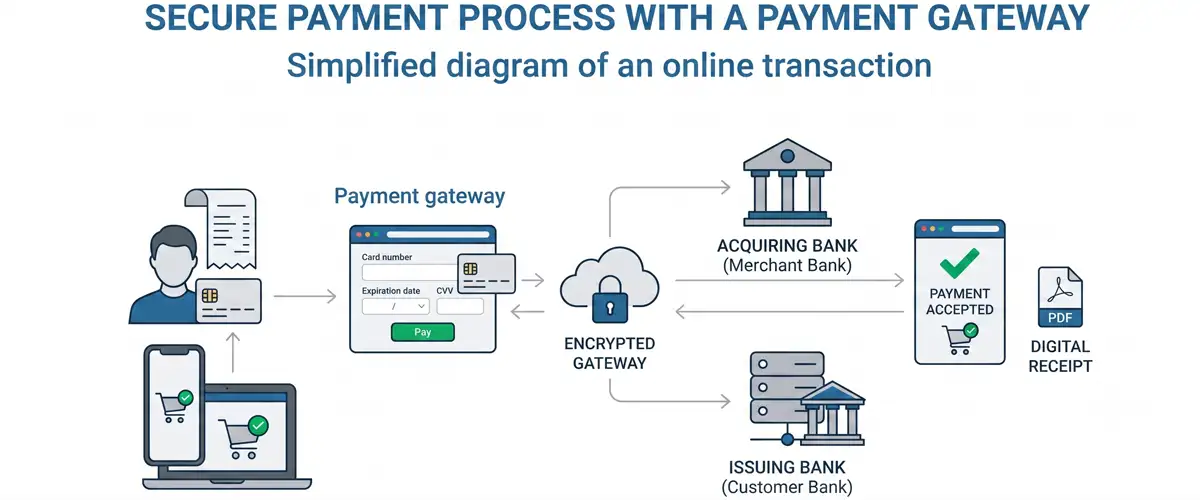
A payment gateway is the software that processes and authorizes transactions whenever a customer attempts to pay on your website, mobile app, payment button, pay-by-email link, or checkout link. It acts as a middleman between the customer, your business, the acquiring bank, and card networks like Visa, Mastercard, American Express, and Discover.
Its primary purpose is to enable secure customer payments without forcing you to handle, store, or process sensitive card data directly. This applies to both credit cards and debit cards, which operate through the same processing system but feature distinct characteristics regarding available funds and transaction limits. From a technical standpoint, it is a web server equipped to encrypt data, connect to banking networks, run fraud detection rules, and return an authorization result (approved or declined) in milliseconds.
For merchants, a payment gateway is the digital equivalent of a physical point-of-sale (POS) terminal. Without it, running a viable e-commerce store is impossible. Industry data shows that 65.3% of online store revenue flows through payment gateways, emphasizing that it is not a secondary tool, but the primary revenue engine of any digital business.
Real impact on conversion, cash flow, and profit margins
Choosing the wrong payment gateway directly hits your bottom line. A slow, multi-step, or untrustworthy checkout experience triggers cart abandonment. Given that 18% of abandoned carts stem from overly complex checkout processes, introducing technical friction at the gateway level only multiplies that figure.
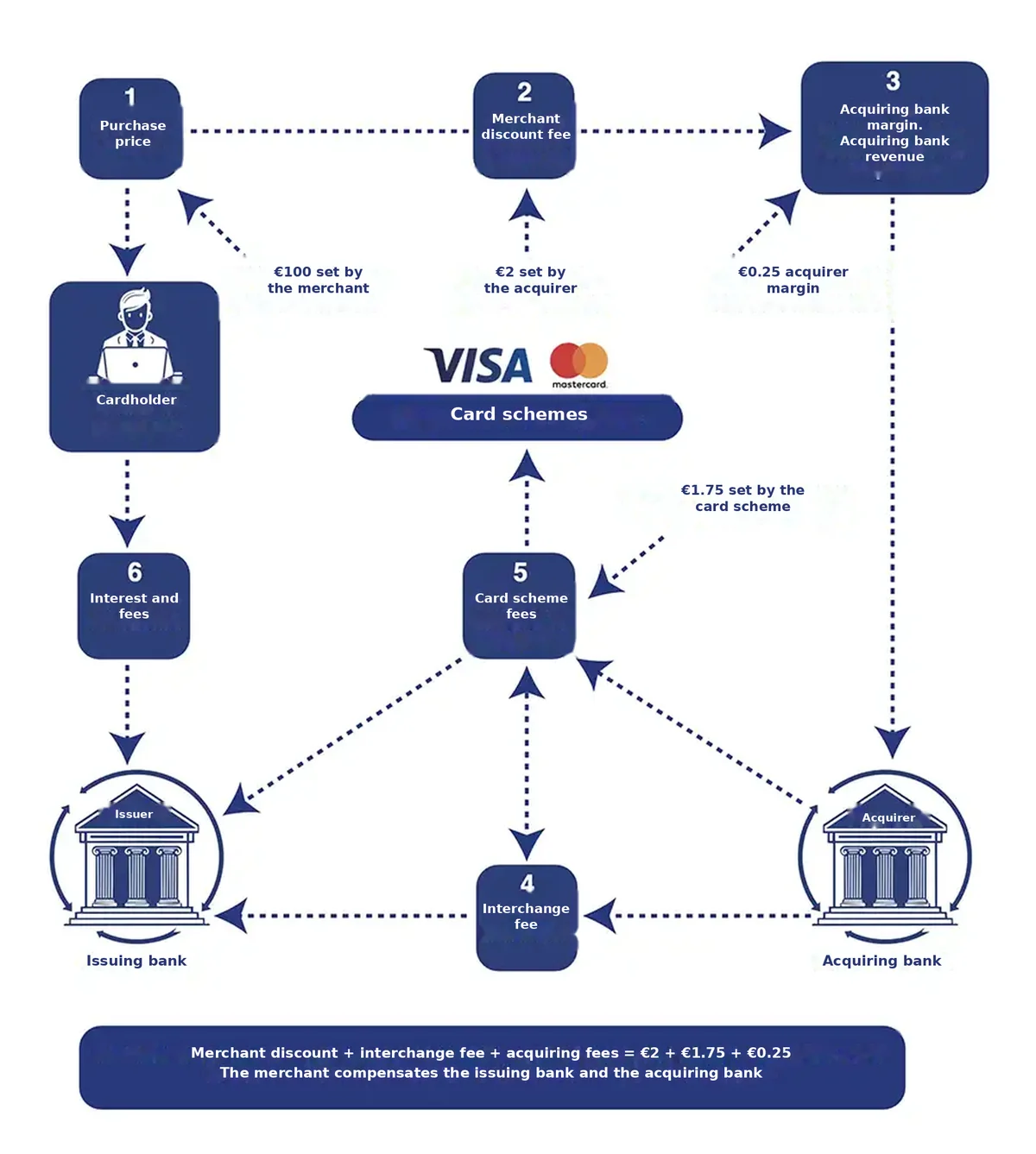
From a cash flow perspective, every gateway charges a transaction fee. This fee can be a fixed percentage of the sale amount (typically between 0.55% and 3%), a flat transaction fee (between €0.20 and €0.30), or a combination of both. For a store generating €100,000 per month, the difference between selecting a gateway charging 1.5% versus one charging 2.5% equates to €1,000 in lost profit margin every single month.
In addition, many gateways charge hidden fees: monthly maintenance costs, refund fees, integration charges, or chargeback penalties. A merchant who fails to audit these fees could end up paying up to 50% more than expected.
From a security standpoint, a gateway with weak fraud detection leaves you exposed to direct financial losses from fraudulent transactions and non-compliance fines from standards like PCI DSS. High chargeback rates can even lead your acquiring bank to close your account or raise processing fees to unsustainable levels.
Technical architecture: How a payment gateway works
The flow of a transaction through a payment gateway is a carefully choreographed sequence of cryptography, validation, and risk assessment taking less than 3 seconds. Understanding each step allows you to diagnose errors, negotiate better terms with providers, and build a checkout experience that minimizes friction without compromising security.
Step 1. The customer initiates checkout and the gateway activates
When the customer clicks "Place Order" or "Pay Now," your online store redirects their browser to the payment gateway (or loads an embedded gateway iframe on your page). At this point, the gateway creates a unique, temporary session for that transaction. This session identifier is critical: it prevents concurrent payments over the same connection and shields against code injection attacks.
Step 2. The customer enters payment details
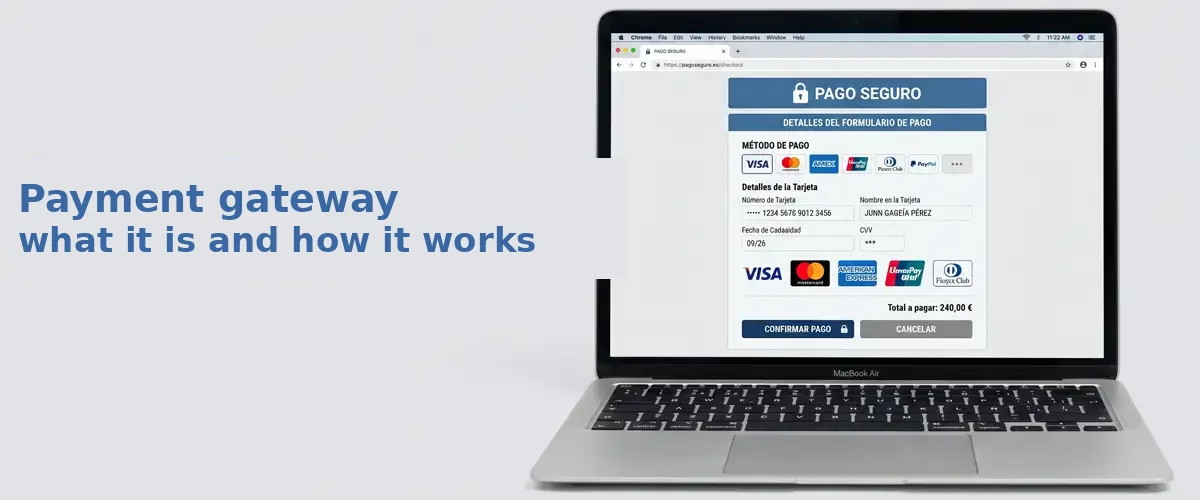
The customer views a payment form. This form is served directly by the gateway rather than your server—a vital step for security. If your web server were to store card details directly, you would be required to maintain full PCI DSS compliance, which is both complex and costly. Delegating form management to the gateway transfers a significant portion of regulatory risk to the provider.
The entered payment details (card number, expiration date, CVV, cardholder name) travel encrypted directly from the customer's browser to the gateway server. This is where SSL/TLS encryption comes into play: data is secured in transit through industry-standard encryption protocols, effectively traveling inside a sealed envelope that only the gateway can unlock.
Step 3. The gateway encrypts, validates, and routes the authorization
Before sending data to the bank, the gateway checks for basic validity: ensuring the card number satisfies the Luhn algorithm (a formula designed to catch typos), verifying that the expiration date hasn't passed, and confirming the CVV contains 3 or 4 digits.
Next, the gateway encrypts sensitive data using military-grade encryption (AES-256 or higher). Once encrypted, this data travels over a secure HTTPS connection to the acquiring bank (the regulated entity processing payments on behalf of your merchant account). PayOk relies on a premium regulated acquiring entity during this stage to ensure all security standards are met.
The acquirer receives the encrypted payload and queries Visa, Mastercard, or the relevant card network. The network routes the request to the customer's bank (issuing bank). The issuing bank verifies available funds, evaluates fraud risk, and confirms the card isn't blocked. In milliseconds, the issuing bank returns a payment authorization response (typically "0000" for approval, or an error code for rejection).
Step 4. The gateway returns the result to the customer and your store
The authorization result travels back through the gateway. Upon approval, the gateway generates a unique Acquirer Reference Number (ARN) and passes it to your store. Your system updates the order status to "Paid," redirects the customer to a confirmation page, and triggers a confirmation email.
If the payment is declined, the gateway returns a specific error code. This is where customer retention becomes key: a well-designed gateway allows the customer to retry with a different card without losing their cart contents. An inferior gateway simply declines the transaction and forces the customer to start over from scratch.
Handling sensitive data and Tokenization
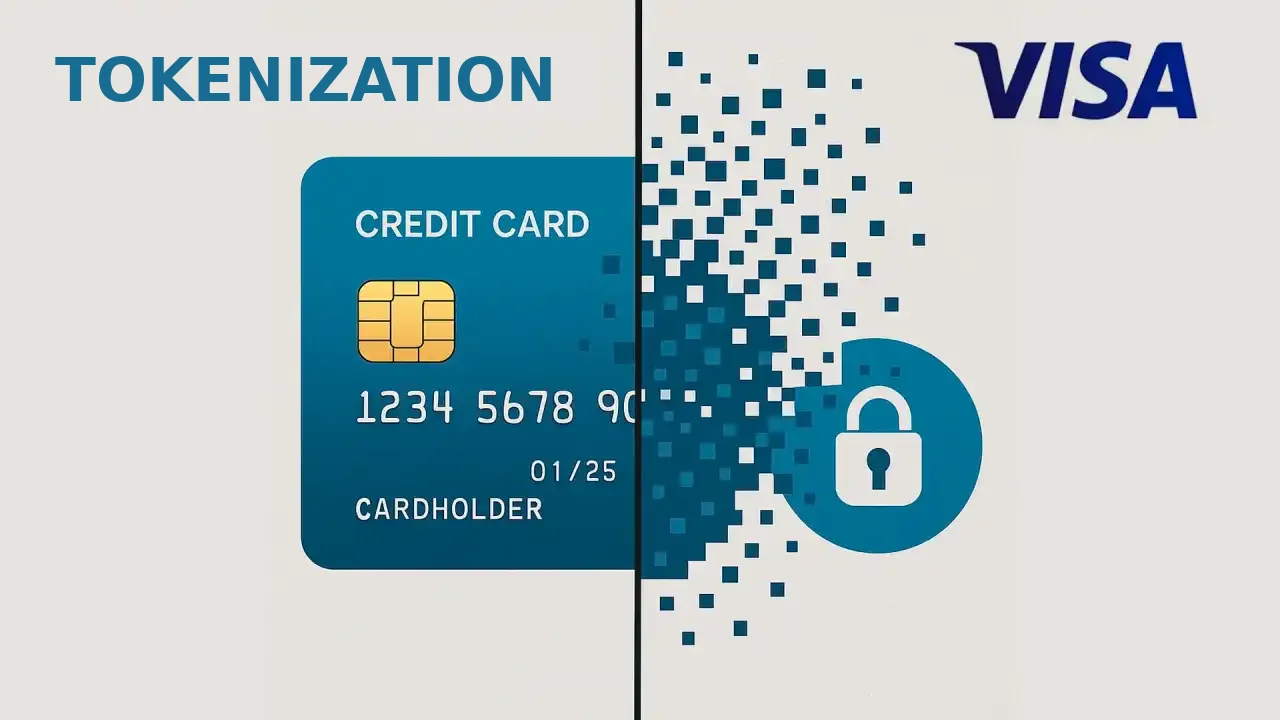
A fundamental concept in payment gateway architecture is how it processes sensitive information. When a customer enters card details, those credentials cannot be stored in plain text in your database or on unsecured servers. Modern gateways leverage tokenization, replacing sensitive card data with a unique alphanumeric string (token) that represents the card without exposing actual card numbers.
Tokenization delivers several vital benefits. First, it enables recurring payments (subscriptions) without storing raw card numbers on your systems. Second, it simplifies payment verification for returning customers without requiring them to re-enter details. Third, it automatically satisfies key PCI DSS requirements because sensitive data never touches your infrastructure.
When a returning customer makes a repeat purchase, the gateway can offer a seamless one-click checkout using the stored token. This dramatically reduces friction—transforming a 2-minute checkout form into a 5-second confirmation, driving measurable gains in conversion rates.
Payment Gateway vs. Payment Terminal
These terms are often confused, but distinguishing between them is critical when choosing the right infrastructure for your business.
A payment gateway is software designed to process online payments via websites, mobile apps, or payment links without requiring hardware beyond an internet connection. It is the standard choice for e-commerce.
A payment terminal (POS, card reader) is a physical device installed at a physical checkout counter. It captures card data in person, verifies PINs or signatures, and authorizes payments in real time. It is the standard for brick-and-mortar retail.
Today, these worlds overlap with the Virtual POS or virtual terminal—a software app that mimics a physical card reader on a mobile device or tablet. It allows merchants to accept in-person payments without dedicated hardware, though with slightly less durability than traditional bank terminals. Web-based virtual terminals are also available, running directly in a browser without requiring app installations.
The table below highlights key operational differences:
| Aspect | Payment Gateway | Payment Terminal (POS) | Virtual POS |
|---|---|---|---|
| Usage Environment | Online, apps, payment links | In-person, counter | In-person, mobile |
| Hardware Needed | None (web server only) | Dedicated POS terminal | Smartphone/tablet |
| Data Capture | Customer inputs card number | Chip insert or magstripe swipe | NFC tap or manual entry |
| Customer Action | Customer clicks "Pay" | Customer present, enters PIN or signs | Customer present, biometric authentication |
| Security Standard | PCI DSS, 3D Secure 2.0 | EMV, PIN protected | PCI DSS, biometrics |
| Operational Friction | Medium (requires browser) | Low (contactless tap) | Medium-low (app dependent) |
| Typical Cost | 0.5% - 2.5% + fixed fee | 0.3% - 0.9% + monthly fee | 0.5% - 3% |
Alternative Payment Methods (APMs) and diversification
Modern payment gateways extend far beyond credit and debit cards. They incorporate APMs (Alternative Payment Methods) tailored to regional and demographic preferences. For instance, customers in Germany often prefer SEPA Direct Debit, Swedish shoppers lean toward Swish, and in Spain, solutions like Bizum and PayPal are rapidly expanding.
Supporting multiple APMs within a single gateway is crucial because payment preferences vary significantly by region. In the Netherlands, iDEAL dominates the market, whereas Italian retail relies heavily on SatisPay. A gateway restricted solely to card processing risks missing out on 20% to 30% of potential transaction volume in specific markets.
In addition to driving volume, APMs play a vital role in fraud mitigation. Direct bank transfers carry virtually zero chargeback risk because funds move directly between accounts without unilateral buyer reversals. Conversely, credit card payments remain open to chargeback disputes for up to 180 days post-transaction.
Regulatory Compliance: PSD2, PCI DSS, and Fraud Prevention
Operating a payment gateway in Europe requires strict adherence to regulatory standards. Two key regulations shape how gateways function and process payments.
The first is PSD2 (Payment Services Directive 2), European regulation mandating Strong Customer Authentication (SCA) for most online payments. In practice, this is implemented via 3D Secure 2.0, requiring issuing banks to verify customer identity using two of three factors: something they know (password/PIN), something they have (phone/device), or something they are (fingerprint/Face ID). While low-value or low-risk transactions may qualify for exemptions, a poorly configured gateway can apply SCA indiscriminately, introducing unnecessary friction at checkout.
The second is PCI DSS, the global security standard governing how cardholder data is stored, transmitted, and processed. By delegating checkout forms to your payment gateway, the bulk of PCI compliance shifts to the provider's infrastructure. However, merchants must still complete a Self-Assessment Questionnaire (SAQ). Choosing a gateway that isn't certified under the current standard (PCI DSS v4.0) exposes your business to audits, fines, or losing card processing privileges entirely.
The gateway is the software that captures and encrypts the card data. The processor is the bank that authorises the transaction and moves the money. Many merchants confuse the two and end up buying the wrong tool for what they actually need.
No. A gateway processes payments online without any hardware. A virtual POS mimics a physical card terminal on a phone or browser so you can take payments in person. Both can coexist, depending on whether you sell online, face to face, or both.
Between 0.5% and 2.5% per transaction, plus a fixed fee in many cases. On top of that come possible hidden costs: monthly maintenance, refund charges or chargeback penalties, which can push the bill up to 50% higher than expected.
Authorisation is immediate, but it does not mean the money is already in your account. Actual settlement happens 24 to 48 hours later, through the bank clearing process.
Yes, though to a lesser extent. The gateway takes on most of the compliance burden by hosting the payment form itself, but your business is still required to complete a minimum self-assessment questionnaire (SAQ).
Was this post useful?
1 of 1 I found it useful

Leave a Comment
Ready to get started?
Create your PayOk account in minutes. No maintenance fees, pay per transaction.